Interfaces
In summary, the interfaces are:
Name |
Description |
|---|---|
Preprocessing |
Transform the input data files to a standard format for use by the inline metrics code |
Cyclone tracking |
Use preprocessed input and produce cyclone tracks |
AR tracking |
Produce atmospheric river regions |
Other inline metrics |
e.g. frontal identification, MCS tracking etc |
Postprocessing |
Take the output files and process in required ways, for example to compress files, produce annual files send to storage, etc |
Input Files
The inline model metrics code requires netCDF files as input to the preprocessing task. These input files can be sourced from wherever the user requires - e.g. model output, reanalysis etc. Currently the um_preprocess task is configured to transform output from the UM (as below) to the standardised format for the inline codes. Other preprocess tasks can/will be developed for alternative inputs (e.g. reanalysis, other climate models, etc).
Input Files from Unified Model (UM)
These are currently being produced by the UM’s postproc task. The form that these files take is defined by the UM’s postproc code, and take the form defined in the um_file_pattern input variable pattern:
um_file_pattern="{runid}a.{stream}{date_start}_{variable}.nc"
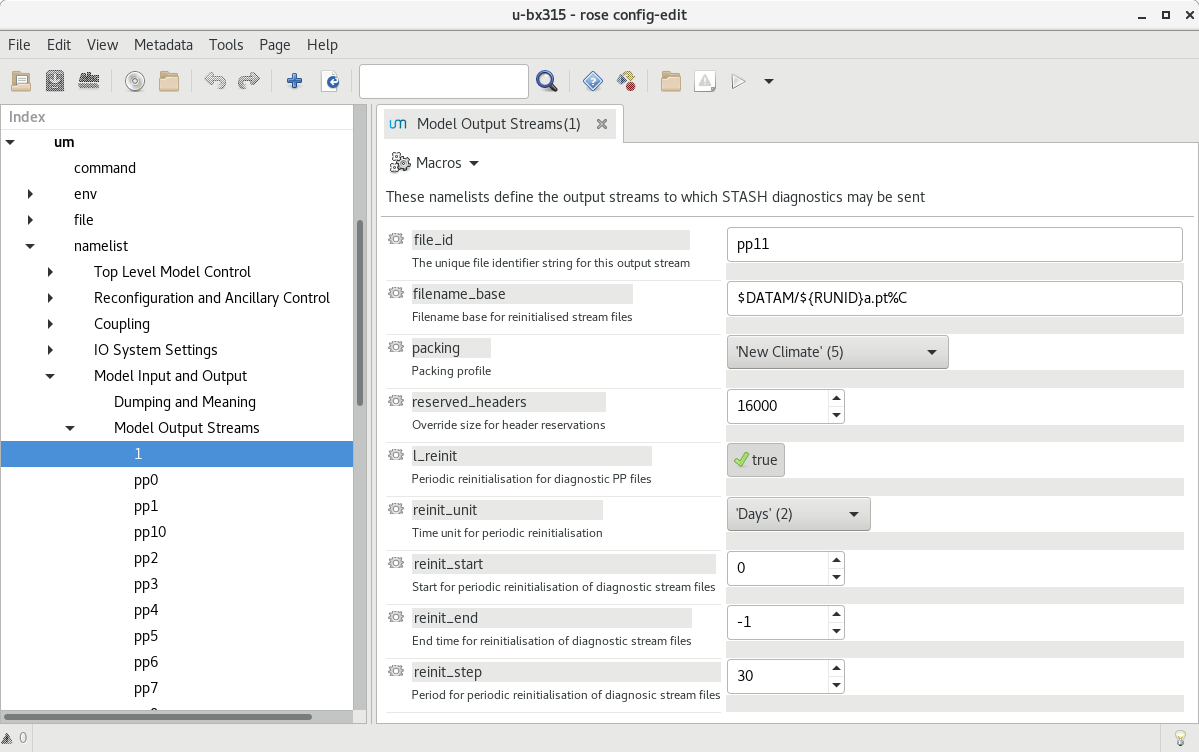
The following images show how these have been configured in rose edit. Example namelists to add to Rose configuration files will be added to this repository in the future.
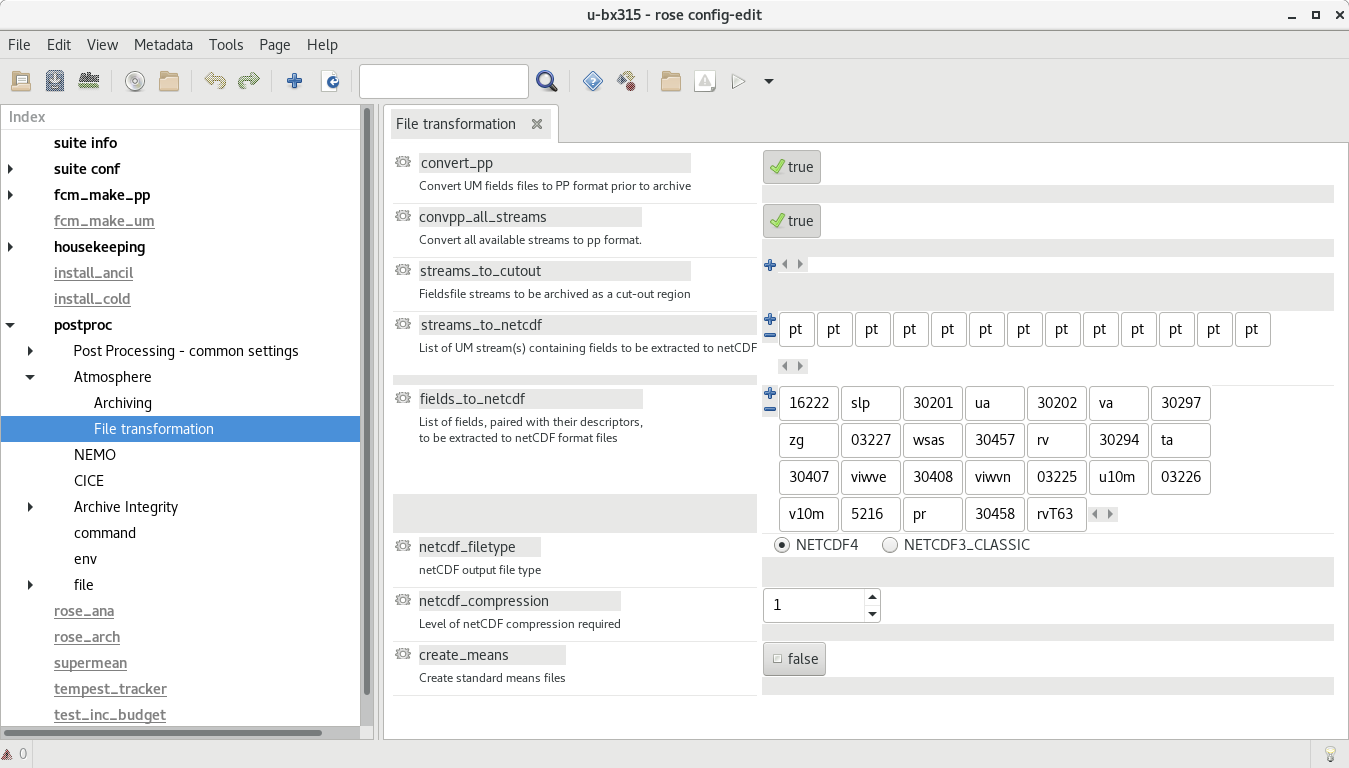
In the Model Output Streams then the reinit_step value of the netCDF stream must equal the resubmission period EXPT_RESUB defined in rose-app.conf so that the netCDF files are available to the tracking task when the subsequent postproc task has completed.
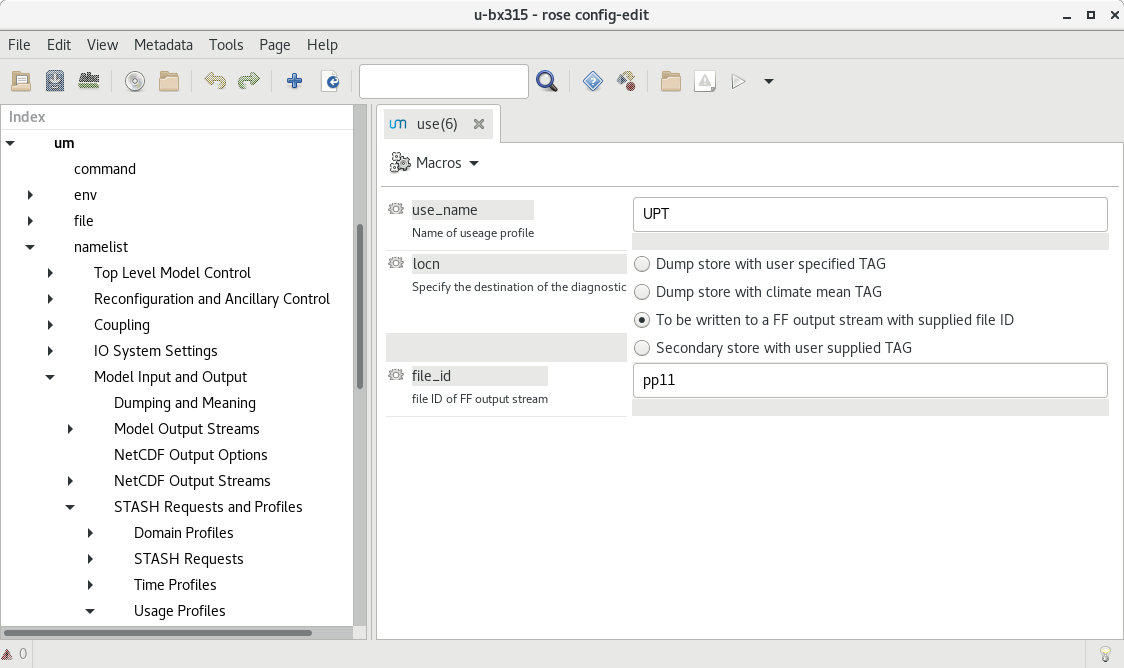
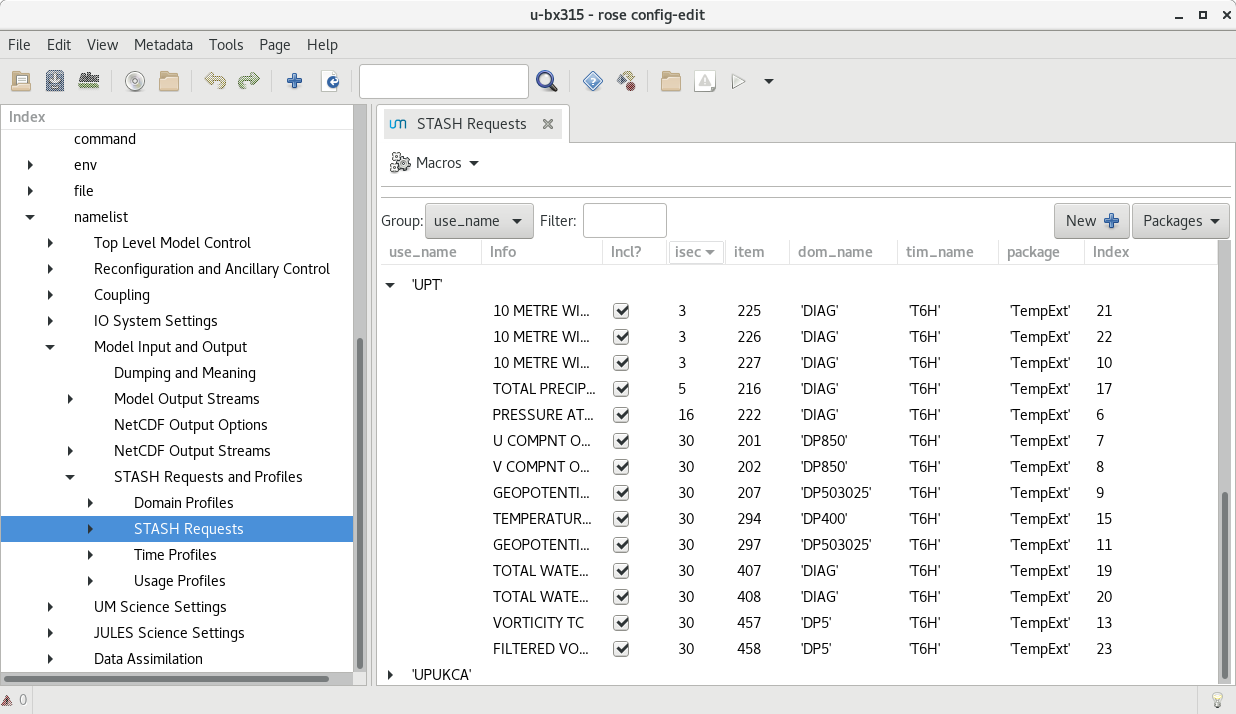
In this configuration, files are saved in the $DATAM directory.
The str names of these files must correspond to those of the [tc/ar]_variables_input in the rose-app.conf for the different tracking schemes.
The path that the tracking uses to read these files is configured in the input_directory value in rose-app.conf.
The input netCDF files are not currently archived, but can be deleted after the processing has been run via logical delete_source value in the rose-app.conf.
Environment Variables
The Python code requires the following environment variables to be set:
Name |
Description |
|---|---|
CYLC_TASK_CYCLE_TIME |
The Cylc task cycle (current) time |
RUNID (by default) or SUITEID_OVERRID or CYLC_SUITE_NAME |
The UM RUNID (e.g. cb196) An override runid for input files (e.g. if running tracking under a serparate suite name |
SUITEID_OVERRIDE (default) or CYLC_SUITE_NAME |
The UM SUITEID (e.g. u-cb196) consistent with RUNID_OVERRIDE above |
TIME_CYCLE |
The current cylc CYCLE time |
PREVIOUS_CYCLE |
The previous cylc CYCLE time |
TM2_CYCLE |
|
TP2_CYCLE |
|
STARTDATE |
The start date for this cycle |
ENDDATE |
The end date for this cycle |
LASTCYCLE |
The date for the last cycle |
IS_LAST_CYCLE |
Logical, is this the last cycle of the simulation |
NCODIR |
The directory path to nco |
MPLBACKEND |
The matplotlib backend (when DISPLAY is not defined) |
INLINE_TRACKING |
Boolean (true or false) whether run inline or from archive |
RESOL_ATM |
The code representing the atmosphere resolution, e.g. n96e |
In the default configuration, the following environment variable is used in rose-app.conf and needs to be set by the suite (which happens by default in standard UM suites):
Name |
Description |
|---|---|
DATAM |
The data output working directory |
Input variables in common
These variables are for the cyclone tracking:
Name |
Description |
|---|---|
data_frequency |
The time frequency of the input data |
delete_processed |
Delete the processed input files - move to postproc |
delete_source |
Delete the source input files - move to postproc |
in_fmt_stitch_default |
Default input file format command to tc_stitch |
input_directory |
The input directory containing processed files |
nodeedit_vars |
Variables to be used in nodeedit |
orography_dir |
Directory containing the orography input files |
outputcmd_detect_default |
Default command for output from tc_detect |
output_directory |
Directory containing output files |
out_fmt_profile1_default |
Default command for output from tc_editor |
out_fmt_profile2_default |
Alternative default command for output from tc_editor |
plot_tracks |
True/False to plot tracks as png file |
regrid_resolutions |
[“”] List. Resolutions to regrid input before tracking |
tc_detect_script |
Location of tc_detect executable |
tc_stitch_script |
Location of tc_stitch executable |
tc_editor_script |
Location of tc_editor executable |
track_types |
[“”] List. Keys to the parameter input namelists |
tc_variables_input |
[“”] List. Variable names in input filenames |
tc_variables_rename |
[“”] List. Names to use on processed input files |
um_file_pattern |
File string. Format of input files |
file_pattern_processed |
File strong. Format of processed files |
Preprocessing Input Files
The input netCDF files require various transformations before the inline metrics can use them. The preprocessing performs these transformations and saves the resulting files in the output directory. The filenames of these generated files is defined in the variable file_pattern_processed to be in the form:
{variable}_{frequency}_{runid}_{date_start}-{date_end}
The variables to be produced in this way, and renamed, are defined in two input variables:
tc_variables_input

tc_variables_rename
The variable names in tc_variable_rename will be inserted into the processed netcdf files, and hence be standardised for the inline model metrics code.
If extra input variables are needed that require being calculated from some the above input variables (i.e. derived variables), then the variable names need to be defined in an input variable:
derived_variables_input
It is assumed that the preprocessing code knows how to produce these derived diagnostics.
The intermediate netCDF files are not currently archived, and can be deleted after the processing has been run via the logical delete_processed value in the rose-app.conf.
Tracking on regridded model grids
The input netCDF files may also be regridded to specified UM grids defined by regrid_resolutions defined in rose-app.conf. If this is not None, then as well as the tracking being done on the native grid that the model is using, an additional set of tracking will be performed on the grid specified. regrid_resolutions takes the form of a list [‘N96’]. The resolution string must exist as an orography file (see below under Orography Files), using that grid for the regridding.
Output Files
The path to the output files is specified by output_directory in rose-app.conf. The following files are generated from tempest_cyclone:
Name |
Description |
|---|---|
{runid}_candidate_{time}_{track_type}.txt |
The candidate file generated by the TempestExtremes detection |
{runid}_track_{time_range}_{track_type}.txt |
The tracked file generated by the TempestExtremes stitching |
{runid}_track_{time_range}_{track_type}.png |
(Optional) The plotted tracks for the specified time period |
{runid}_candidate_year_{year}_{track_type}.txt |
All candidate files for one year concatenated together |
{runid}_track_year_{time_range}_{track_type}.txt |
The stitching output for one year |
{runid}_track_year_{year}_{track_type}.png |
(Optional) The plotted tracks for the specified year |
{runid}_candidate_fullrun_{time_range}_{track_type}.txt |
All candidate files for whole period of model simulation concatenated together |
{runid}_track_fullrun_{time_range}_{track_type}.txt |
The stitching output for whole period of model simulation |
The following files are generated from tempest_atmos_river:
Name |
Description |
|---|---|
{runid}_ARmask_{time}_{ar_type}.txt | The atmospheric river mask file generated by the TempestExtremes AR detection |
|
The output files are not currently archived after the processing has been run.
Orography Files
An orography file for each grid being tracked should be placed in the directory specified by the orography_dir value in rose-app.conf. The file to use is identified from the number of longitude points in the the input files and is specified using the standard UM N grid name. The orography files should have a name in the form:
orog_HadGEM3-GC31-<n-code>e.nc
For example a file with 512 longitude points is on the N216 grid and will be called:
orog_HadGEM3-GC31-N216e.nc
The orography file can be used within the tracking codes to check that storms are over the ocean/land for min/max durations.
Track types
The list track_types in rose-app.conf is the selection of identification/tracking recipies to be used, with details of each contained in the rose-app.conf. Similarly the list ar_types is the selection of atmospheric river recipies.
Variables output
The variables output by the cyclone tracking (in txt and netCDF file if specified) are specified by the command in the track_types, either the corresponding _stitch or _profile if the latter exists. These arguments contain an out_fmt component, which details all the output variables. The tracking code will interpret this string of variables, and use them as variable names in the netCDF file.
Other cyclone tracking variables
The variable list specified in the out_fmt command mentioned above can be long and repetitive across different track_types. To help with this, standard template values for in_fmt and out_fmt can be provided in the [common] part of the cyclone tracking rose-app.conf file. Specifically:
output_detect_default can be defined in [common], and used for the output from the detect command;
in_fmt_stitch_default can be defined in [common], and then used at the in_fmt argument for _stitch and _profile;
out_fmt_profile1 and out_fmt_profile2 can be used in [common] for the out_fmt of the _profile step.
Note that these need to be consistent with each other, as the code is unable to check that the output from one command is consistent with the input to the next command.